
Amendments End to End
Scanner output records what a tool observed. Amendments record further context you want to provide to those observations. For example:
- "This CVE has an accepted remediation plan."
- "That finding is waived by the Authorizing Official."
- "This control is inherited from the platform."
- "Our environment configuration means that the full computed CVSS score for this vulnerability is lower/higher."
Note that these are all facts that your scanner tool has no way to know at the time of the scan. So we need to amend them to the results.
HDF keeps these two concerns in separate documents — results stay an untouched record of the scan, and amendments are standalone, reusable, individually attributable documents that get merged in when you need the effective view. We do not do this by removing the original finding from the HDF Results document, because if we could do that we'd reduce trust in the document. Instead, HDF Results carry an audit trail of any amendments applied to the document, so that the original data from the scanner tool is preserved while still allowing processes that consume HDF to read fully contextualized data.
This guide walks the full lifecycle with a real example: a container scan that keeps flagging a CVE you already have a POA&M for. You will author the POA&M once, apply it, and then keep applying the same document to every future scan automatically.
The transcripts below are real output from hdf against the Grype sample data in this repository.
The recurring finding
Start by normalizing scanner output into HDF. Any supported scanner works; here a Grype container scan (a copy of one of this repo's fixtures, which you can see at hdf-converters/converters/grype-to-hdf/fixtures/input/anchore_grype.json):
$ hdf convert anchore_grype.json -o scan-monday.json
Detected: Grype (confidence: 100%)

$ hdf list scan-monday.json
Baselines:    1
Requirements: 89
Components:   1

  ✗ failed          89
One of those 89 is Grype/CVE-2021-36159, a vulnerability in the base image that your organization has already triaged. Remediation is scheduled, the risk is documented, and a POA&M exists. Without amendments, every scan re-raises it and every reviewer re-triages it.
Author the amendment once
Point hdf amend create at the results file and it walks you through authoring interactively:
$ hdf amend create scan-monday.json -o cve-poams.jsonThe form first lists every requirement from the results file (with a status legend — SPACE selects, ENTER confirms), then collects each selected requirement's details: the amendment type (waiver, attestation, false positive, risk adjustment, operational requirement, POA&M, or inherited), the reason for the amendment in plaintext, the expiration (relative forms like 30d/6m/1y or a bare date), and the approver's identifier.
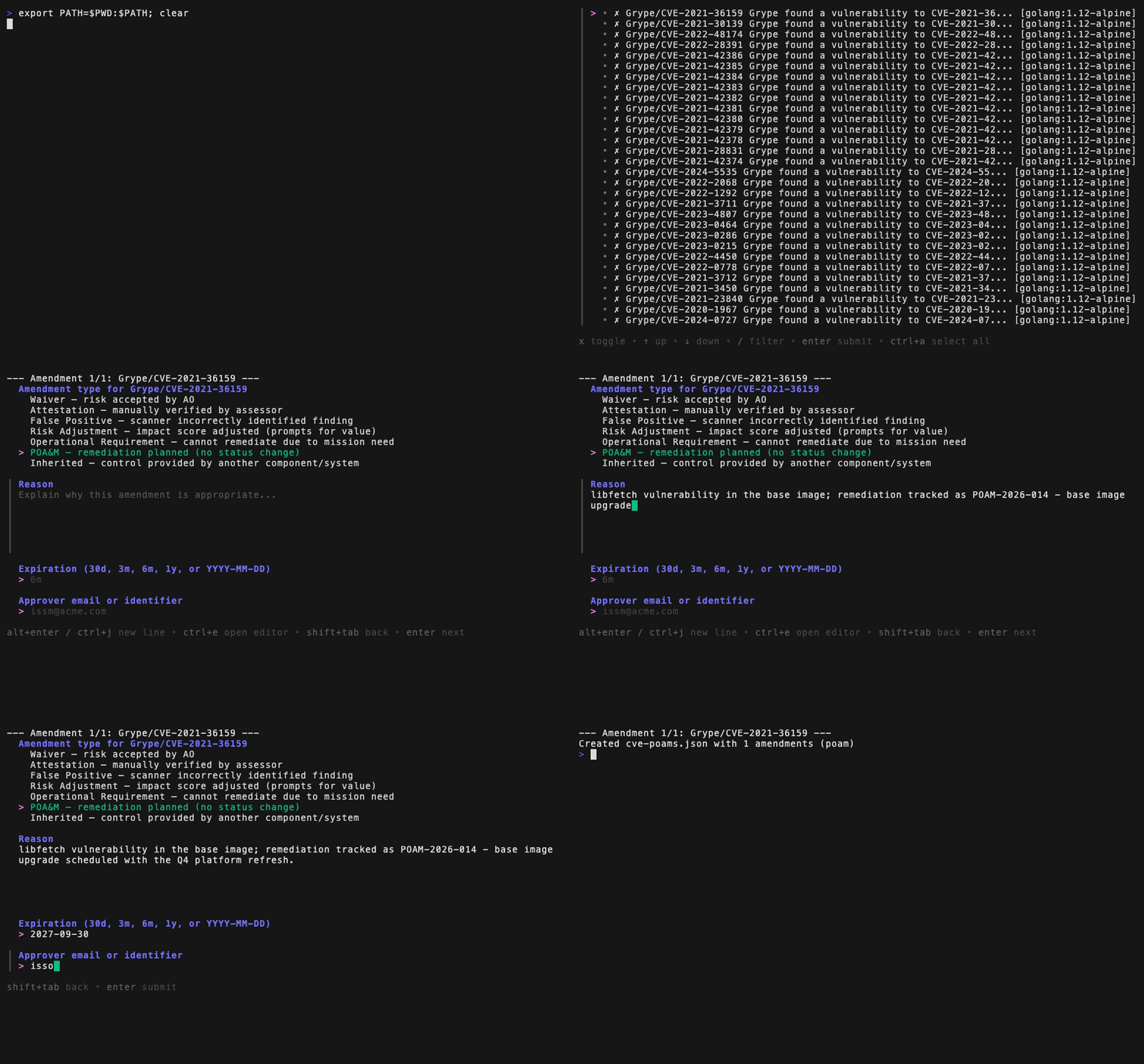
Everything you entered lands in an amendments document:
$ cat cve-poams.json
{
  "name": "poams-2026-09-04",
  "overrides": [
    {
      "appliedAt": "2026-09-04T14:13:32Z",
      "appliedBy": {
        "identifier": "isso@example.org",
        "type": "email"
      },
      "expiresAt": "2027-09-30T23:59:59Z",
      "reason": "libfetch vulnerability in the base image; remediation tracked as POAM-2026-014 - base image upgrade scheduled with the Q4 platform refresh.",
      "requirementId": "Grype/CVE-2021-36159",
      "status": "failed",
      "type": "poam"
    }
  ]
}
The interactive form is one of three authoring routes; all converge on this same document shape. For automation, hdf amend create --from spec.json builds the document headlessly from a lean spec array — the place to attach richer fields the form does not collect, such as POA&M milestones (the waiver later in this guide is authored that way). All three hdf amend create routes schema-validate the result before writing anything, so a wrong value is rejected with the exact schema error rather than producing an invalid file. hdf amend draft is deliberately outside that gate: it emits incomplete stubs for you to fill in, which are not yet valid amendments. And to generate starting stubs from the scan itself instead of typing requirement IDs, hdf amend draft enumerates a results file for you — see Scaffolding at scale.
Inspect what you made:
$ hdf amend list cve-poams.json
Amendments: poams-2026-09-04

Amendments (1):
Requirement           Type  Status  Impact  Expires     Reason
--------------------  ----  ------  ------  ----------  -------------------------------------------------------------------------------------------------------------------------------------------
Grype/CVE-2021-36159  poam  failed          2027-09-30  libfetch vulnerability in the base image; remediation tracked as POAM-2026-014 - base image upgrade scheduled with the Q4 platform refresh.

$ hdf amend verify cve-poams.json
Total amendments: 1
Valid:            1
Expired:          0
Invalid:          0
Chain:            not established

All amendments are valid.
Note the status column: the POA&M pins failed. Filing a remediation plan does not "make the system compliant," it simply documents that the finding is being addressed. The finding stays in an overall status of "failed" until a future scan actually shows the fix. Amendment types that do change the effective outcome (waivers, false positives) carry that status explicitly; the schema requires every non-documentation override to state a status or an impact.
Apply it
$ hdf amend apply --results scan-monday.json --amendments cve-poams.json -o scan-monday-amended.json
Merged output written to scan-monday-amended.json
The results file is unchanged; the amended copy carries the merge. On the amended requirement, three things appeared:
effectiveStatus: failed— the post-amendment status consumers should read (unchanged here, by POA&M design)disposition: poam— which kind of decision currently governs this requirementstatusOverrides[]— the audit trail: who applied it, when, why, and the expiry (milestones stay in the standalone amendments document, which remains the POA&M's system of record)
Viewers and downstream tooling read the effective layer; auditors read the trail.
Amendments applied to multiple re-scans over time
To continue the example, imagine Tuesday's pipeline run scans the same image with the same underlying base image issue. The Grype tool has no idea that our specific organization has already issued a POA&M for CVE-2021-36159. So the scan "finds" the same CVE. But our HDF Amendment file, representing our POA&M, is a standing document and not an annotation trapped inside Monday's file:
$ hdf convert anchore_grype.json -o scan-tuesday.json
Detected: Grype (confidence: 100%)

$ hdf amend apply --results scan-tuesday.json --amendments cve-poams.json -o scan-tuesday-amended.json
Merged output written to scan-tuesday-amended.json
The fresh file comes out with the same disposition: poam and the same audit trail. This is what standalone amendments documents are for: author the decision once, keep it in the repository (or a governance store) alongside your threshold templates, and let the pipeline apply it to every run:
- name: Normalize scan and apply standing amendments
  run: |
    hdf convert anchore_grype.json -o scan.json
    hdf amend apply --results scan.json --amendments governance/cve-poams.json -o scan-amended.json
    hdf validate threshold scan-amended.json -T governance/thresholds.yaml
A finding with an accepted, unexpired POA&M never gets re-triaged by a human again — and because the POA&M deliberately keeps effectiveStatus: failed, it also never silently disappears from the compliance picture. When the base image finally upgrades, the CVE drops out of the scan itself and the amendment simply stops matching anything.
When the decision does change the outcome
Waivers are the contrast case: the Authorizing Official accepts the risk, and the effective status genuinely changes.
[
  {
    "requirementId": "Grype/CVE-2021-30139",
    "type": "waiver",
    "status": "notApplicable",
    "reason": "apk-tools is not invoked at runtime in this image; risk accepted by the AO under waiver WVR-2026-031.",
    "appliedBy": { "type": "email", "identifier": "ao@example.org" },
    "expiresAt": "2027-09-30T00:00:00Z"
  }
]$ hdf amend create --from waiver-spec.json -o cve-waivers.json
Created cve-waivers.json with 1 amendments
$ hdf amend apply --results scan-tuesday-amended.json --amendments cve-waivers.json -o scan-tuesday-final.json
Merged output written to scan-tuesday-final.json
$ hdf list scan-tuesday-final.json
Baselines: 1
Requirements: 89
Components: 1
✗ failed 88
○ not_applicable 1The waived requirement now reads effectiveStatus: notApplicable with disposition: waiver, and compliance rollups and threshold checks — which count by effective status — exclude it. The raw scanner result underneath is untouched, and the override records exactly who accepted the risk and until when.
Scaffolding at scale
Hand-typing requirement IDs does not scale to a scan with dozens of findings. hdf amend draft enumerates requirements from a results file and emits one pre-filled stub per match:
$ hdf amend draft --from scan-tuesday.json --type poam --select "CVE-2022-48174" -o draft.json
Wrote draft draft.json with 2 poam stub(s). Complete each stub and remove the "_draft" marker before applying.
Each stub arrives with requirementId, type, and appliedAt filled in, a human-readable _label identifying the finding, and the substantive fields (reason, appliedBy, expiresAt) left blank for you or an enrichment script to complete.
A completed draft carries no amendment chain
A draft is meant to be edited, so it is not chained: a previousChecksum written over stubs would be stale the moment you filled them in. Nothing re-chains on completion either, so a completed draft verifies as Chain: not established — valid and appliable, but with no tamper evidence. Author through hdf amend create --from <spec> if you want the finished document chained.
The document is marked "_draft": true, and hdf amend apply refuses it until the stubs are completed and the marker removed:
$ hdf amend apply --results scan-tuesday.json --amendments draft.json
Error: amendments document is an incomplete draft: complete the override stubs and remove the "_draft" marker before applying
Expiry and verification
No amendment is permanent — expiresAt is required, and hdf amend verify is the standing health check for your governance documents:
$ hdf amend verify cve-poams.json scan-monday.json
Total amendments: 1
Valid:            1
Expired:          0
Invalid:          0
Chain:            not established

All checks passed.
Verify exits non-zero when any check fails. An expired amendment is a failure, not a warning, and no flag makes one pass — an amendment that has outlived its review date is a suppression with no end date, and the remedy is to review the finding and issue a new one. Wiring hdf amend verify over your governance directory in CI therefore gives you a step that genuinely gates, rather than one that reports and passes.
The three counts are separate because their remedies are: Expired means renew the review, Invalid means the document does not satisfy the hdf-amendments schema, and a broken Chain means an amendment was edited after it was written. With a results file supplied, verify adds one more check: that every requirementId exists in those results. It reports nothing about a results hash stored on the amendments document — one amendments document may be applied to many results files, so it cannot carry a single results hash. The record of what a results document was amended from lives on that results document, as the root preAmendmentChecksum written by hdf amend apply.
hdf amend apply refuses a document that does not verify — expired, structurally invalid, or chain-broken — rather than merging it and leaving the read side to compensate. The same gate applies to the hdf_apply_amendment MCP tool, so an agent cannot apply what the CLI refuses. Read-side enforcement is still there as defence in depth: compliance rollups and threshold checks recompute effective status and ignore expired overrides.
Amendments derived from VEX documents can be born expired
openvex-to-hdf, csaf-vex-to-hdf, cyclonedx-vex-to-hdf and spdx-vex-to-hdf set each override's expiresAt to the source document's own timestamp plus one year. Convert a VEX document older than that and every override arrives already lapsed, so hdf amend apply refuses it. Use hdf amend create --from-vex <vex> --expires <date> instead: it derives the same overrides but makes the review horizon a current, explicit decision.
Where to go next
- Amendments schema reference — every field of
Standalone_Override, the type vocabulary, and the identity shapes - VEX interoperability —
hdf amend create --from-vexbuilds amendments deterministically from supplier VEX statements - HDF MCP server — drafting attestation amendments conversationally, with the same apply pipeline underneath
- The
amendsection of the hdf CLI reference for the complete flag surface